From API Spec to Chatbot: A Guide to Building a Conversational Spotify Ads Manager with Claude Code Plugins
Overview
Imagine managing your Spotify ad campaigns through a simple chat conversation. No need to remember API endpoints or parse complex JSON responses. This tutorial walks you through creating a natural language interface for the Spotify Ads API using Claude Code plugins. The best part? You don't write a single line of compiled code. Instead, you leverage existing OpenAPI specifications and Markdown documentation to teach an AI assistant how to interact with the API. By the end, you’ll have a functional conversational tool that can handle tasks like fetching campaign stats or adjusting budgets, all from plain English commands.
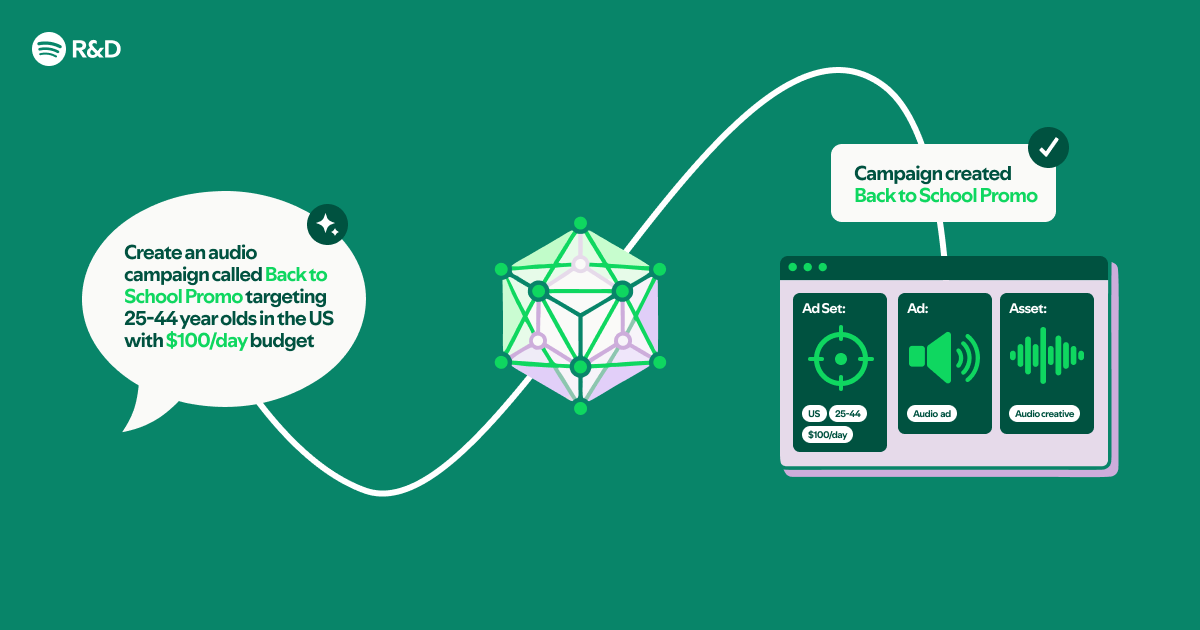
What You’ll Build
You’ll build a plugin for Claude Code that understands natural language queries and translates them into API calls to the Spotify Ads platform. The plugin reads from an OpenAPI spec and accompanying Markdown documentation to learn available endpoints, parameters, and authentication flows. This approach eliminates the need for traditional software development — no compilers, no manual request building. Everything is orchestrated through the plugin’s configuration.
Prerequisites
Before diving in, ensure you have the following ready:
- Spotify Ads API Access – You need a Spotify Ads account with API credentials (client ID and secret). If you don't have one, apply through the Spotify Ads partner program.
- Claude Code and Plugin System – Install Claude Code (Anthropic's coding assistant) and enable plugins. Familiarity with running Claude Code in your terminal or IDE is assumed.
- Basic Knowledge – Comfort with command-line tools, reading YAML/JSON configuration files, and a general understanding of REST APIs. No programming language required.
Step-by-Step Instructions
Step 1: Prepare Your API Specification and Documentation
Claude Code plugins can ingest OpenAPI specs and Markdown files to understand how to interact with an API. Start by obtaining the Spotify Ads API’s OpenAPI specification (usually a JSON or YAML file). If it's not publicly available, you can create one from the API documentation. Additionally, collect any Markdown documentation that describes usage patterns, rate limits, and authentication flows. Place these files in a dedicated folder within your project.
mkdir spotify-ads-plugin
cd spotify-ads-plugin
# Copy your openapi.yaml and docs/*.md here
Step 2: Configure Claude Code Plugin for API Interaction
Next, create the plugin configuration file. Claude Code plugins use a plugin.json file that describes the plugin’s metadata and points to the API specification. Below is a minimal example:
{
  "name": "spotify-ads-manager",
  "version": "1.0.0",
  "description": "Natural language interface to Spotify Ads API",
  "openapi": "./openapi.yaml",
  "docs": ["./docs/"]
}
This tells Claude Code to load the OpenAPI spec and all Markdown files in the docs folder. The plugin will automatically parse endpoints, request bodies, and authentication requirements.
Step 3: Define Natural Language Prompts and Actions
With the spec loaded, you now define how Claude should interpret user commands. You do this by writing example prompts in the plugin’s prompts.yaml file. These examples act as training data for the assistant. For instance:
prompts:
  - example: "Show me the impressions for my last campaign"
    action: "GET /campaigns/{campaign_id}/insights"
    parameters:
      campaign_id: "current_campaign"
  - example: "Increase the budget of Ad Set XYZ by 20%"
    action: "PATCH /ad-sets/{ad_set_id}"
    parameters:
      ad_set_id: "xyz"
      budget_increase_percent: 20
You can also include contextual documentation snippets (e.g., “If the user says ‘campaign’, map to campaigns endpoint”).

Step 4: Implement the Conversational Interface
Now, initialize Claude Code with the plugin and start a conversation. Run:
claude --plugin spotify-ads-pluginClaude Code will load the plugin and understand how to call the API. You can then ask natural language questions:
- “What is the total spend of my current campaigns?”
- “Pause the ad set named ‘Summer Sale’.”
- “List all campaigns from last month.”
Behind the scenes, Claude matches your phrase to the nearest action defined in the prompts, extracts parameters, and makes the appropriate API call using credentials you provided separately (via environment variables or a secure vault). The response is then translated back into conversational language.
Step 5: Test and Refine
Test your plugin with various real-world commands. If Claude misinterprets a request, add more prompt examples or refine the Markdown documentation. You can also adjust the prompts.yaml to include edge cases. For example, if users often say “get metrics”, ensure there’s a matching prompt that maps to the metrics endpoint. Iterate until the accuracy is satisfactory.
Common Mistakes
Overlooking Rate Limits
The Spotify Ads API enforces rate limits. Without handling them in your documentation, Claude might make too many calls and get blocked. Add Markdown notes explaining limits and recommend polite query phrasing (e.g., “wait a moment between requests”).
Insufficient Prompt Engineering
If your prompt examples are too sparse, Claude will struggle to map diverse user inputs to the correct API calls. Include variations: “show me the stats”, “I need performance data”, “give me a report on my last campaign”. The more variety, the better.
Ignoring Authentication Flows
The Spotify Ads API requires OAuth 2.0. Ensure your OpenAPI spec includes the security scheme and that your plugin configuration references the correct token endpoint. Without proper authentication, every call will fail. Test with a simple read-only command first to verify credentials.
Summary
You now have a fully functional conversational interface to the Spotify Ads API built entirely from OpenAPI specs and Markdown files, powered by Claude Code plugins. No compiled code was written — just configuration, examples, and documentation. This approach dramatically lowers the barrier for creating custom API assistants, allowing marketers and non-developers to interact with complex systems using natural language. Extend this pattern to any REST API by repeating the same steps: prepare the spec, configure the plugin, define examples, and refine. The result is a versatile tool that makes API management feel like a conversation.
Related Articles
- Python List Flattening: New Efficient Methods Emerge for Developers
- 6 Crucial Facts About the Notepad++ Mac App Trademark Dispute
- Python Developers Gain New Powerful Tools to Flatten Nested Lists
- Connecting Your AI Agent to Atlassian’s Teamwork Graph: A Practical How‑To
- 5 Key Updates About the Python Insider Blog Migration
- JDBC: The Unsung Hero of Java Database Access Gets a Deep-Dive Series
- Mesa Developers Propose Legacy Branch for Older GPU Drivers to Streamline Modern Graphics Support
- NVIDIA Unveils Nemotron 3 Nano Omni: A Unified Multimodal Model for Smarter, Faster AI Agents